Reduce the amount of mail Outlook stores offline
Select from below based on whether you have the New Outlook or Classic Outlook.
If you are unsure which version you have - https://support.microsoft.com/office/what-version-of-outlook-do-i-have-b3a9568c-edb5-42b9-9825-d48d82b2257c
New Outlook
You can use the new Outlook for Windows even when you're not connected to the internet by enabling offline access. When turned on, the new Outlook for Windows saves a copy of your emails, calendar events, and people (previously contacts) to your device, providing access to these items when you're offline and improved performance when you're online.
Your offline settings determine which items are saved to your device and for how long. To set these, see the section below Update offline settings. When you're back online, new Outlook for Windows automatically updates the items that were saved to your device.
Update offline settings in new Outlook
Update these settings to choose which folders to save and how many days of items to save. If you have more than one account, select the account you want the settings to apply to:
Select which folders to save locally:
- Select Settings > General > Offline > Folders to save.
- From the dropdown, select Default (Inbox, sent, drafts, archive, deleted and snoozed), Default and favorites (this is set by default), or Default, favorites, and recently used.
Select the number of days to save emails locally:
- Select Settings > General > Offline > Days of email to save.
- From the dropdown, select 7, 30 (this is the default value), 90, or 180 days of email to save.
Classic Outlook
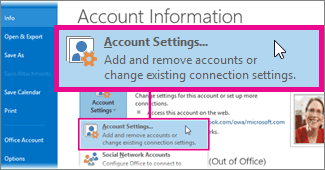
Click File > Account Settings > Account Settings.
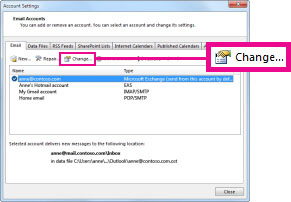
Select an Exchange or Microsoft 365 account, and then click Change.
Related Articles
Reduce the size of your mailbox and Outlook Data Files (.pst and .ost)
TABLE OF CONTENTS Reduce your mailbox size The Mailbox Cleanup tool Use Conversation Clean Up to remove redundant messages Search for large messages Reduce the size of an Outlook Data File (.pst) or Offline Outlook Data File (.ost) The more email you ...How to open a shared mailbox - Microsoft Outlook Desktop Classic
After your admin has added you as a member of a shared mailbox, close and then restart Outlook. The shared mailbox should automatically appear in your Folder pane in classic Outlook. What if it didn't work? If your admin only recently added you to a ...How to open a shared mailbox - Microsoft Outlook Desktop App
Add a shared mailbox to new Outlook After your admin has added you as a member of a shared mailbox, close and then restart new Outlook. The shared mailbox should automatically display in your Folder pane. What if it didn't work? If your admin only ...How to open a shared mailbox - Microsoft Outlook Web
Add the shared mailbox so it displays under your primary mailbox If you want to monitor the email from your primary mailbox and the shared mailbox at the same time, use this method. After you complete this task, the shared mailbox and its folders are ...How to add a Microsoft 365 email account to Microsoft Outlook Desktop for Windows
TABLE OF CONTENTS Step 1: Open Microsoft Outlook Step 2: Open Account Settings Step 3: Enter Your Email Address Step 4: Enter Your Password Step 5: Complete Multi-Factor Authentication (if enabled) Step 6: Finish Setup Step 7: Start Using Your Email ...